What is a Price List?
Price lists are the foundation of every billing operation in BillingEngine. They are structured catalogs of prices that tell you exactly what each type of service costs — even retroactively over time. Without a properly configured price list, the engine cannot rate a single data record.
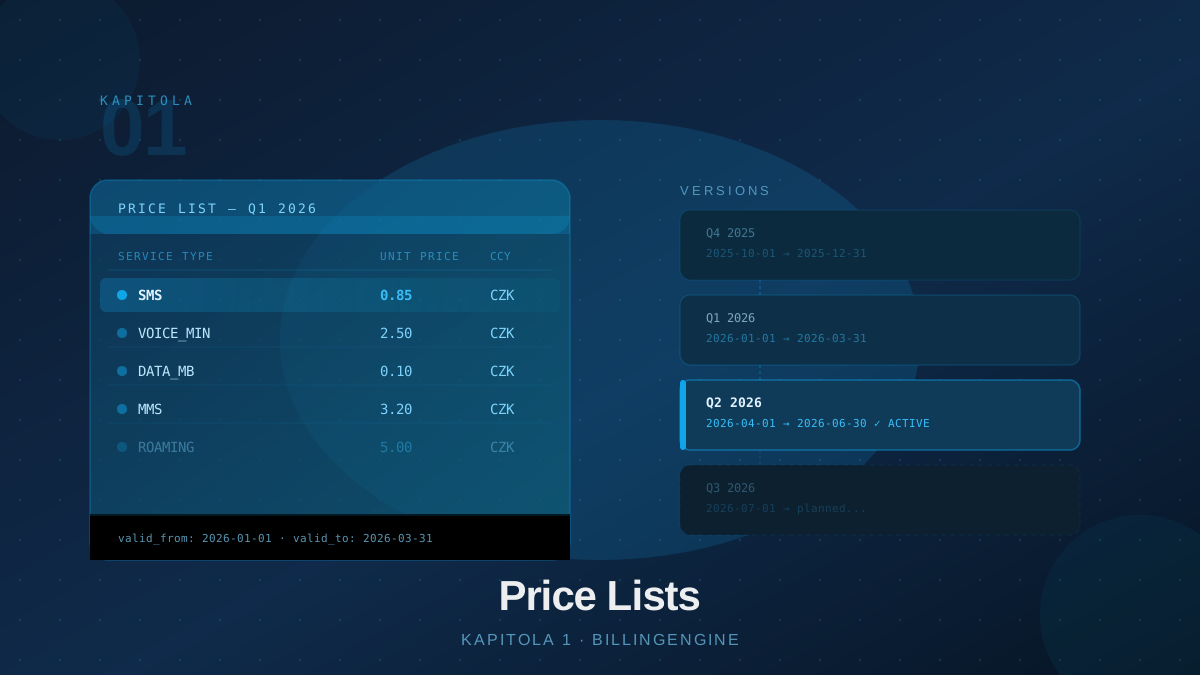
A price list is a named container that groups versions and their pricing items. It does not contain any concrete rates itself — those are stored in its versions. This architecture allows you to change prices without breaking historical consistency.
The hierarchy looks like this:
- Price List — a top-level object with a name, currency, and description
- Version — a set of prices valid from a given date (
valid_from)- Items — concrete rates per
code
- Items — concrete rates per
- Version — a set of prices valid from a given date (
Thanks to this three-layer structure, BillingEngine remembers which rate applied at the moment each record was processed. Historical records remain consistent even after price changes.
Creating a Price List
Create a new price list via the REST API:
POST /api/v1/price-lists
Content-Type: application/json

{
  "name": "Standard B2B Tariff",
  "currency": "USD",
  "description": "Price list for business customers"
}
The response includes an id that you will need when creating versions and referencing the list in pricing rules. The currency field sets the default currency for the price list (defaults to CZK). Choose a descriptive name — "Standard B2B Tariff 2026" is better than "tariff_v3".
Price List Versions
Each price list can have multiple versions. The engine automatically selects the one whose valid_from is the latest but still does not exceed the timestamp of the record being processed. Versions do not need an end date — the engine automatically switches to a newer version on its valid_from date.
POST /api/v1/price-lists/{id}/versions
Content-Type: application/json

{
  "version": "Q1 2026",
  "valid_from": "2026-01-01",
  "description": "Rates valid from January 1, 2026"
}
The version field is the version identifier (e.g. "Q1 2026" or "v2.0"). When you create a version with a later valid_from, the engine switches to it automatically on that date.
Important: Make sure the price list always has at least one version with a valid_from that does not exceed the earliest data record you want to rate. Records without a matching version are flagged as errors.
Price List Items
Price list items define the actual rates. Each item is tied to a specific code (code) and defines a price (price):
POST /api/v1/price-lists/versions/{versionId}/items
Content-Type: application/json

{
  "code": "SMS",
  "price": 0.85,
  "unit": "pcs",
  "vat_rate": 21
}
When processing a data record, the engine finds the item matching the record’s code and calculates the price as quantity × price × (1 - discount / 100). If no item exists for that code, the record cannot be rated and is flagged as an error.
A typical price list for a telecom operator:
| code | price |
|---|---|
| SMS | 0.85 |
| VOICE_MIN | 2.50 |
| DATA_MB | 0.10 |
| MMS | 3.20 |
Currency is set at the price list level (the currency field when creating the list).
Connecting to Customers via Rules
A price list is not assigned to customers directly — this is done through pricing rules. A rule says: “For customers in group X, use price list Y.” This separation allows sharing a single price list among multiple customer groups and updating prices in one place.
Pricing rules are covered in detail in Chapter 2.
Versioning as an Audit Guarantee
Financial systems must be auditable. BillingEngine addresses this by embedding a reference to the exact price list version used in every rated data record. This reference is immutable — the record carries it from the moment of creation and cannot be overwritten retroactively.
So even if you increase the SMS price from 0.85 to 1.10 by creating a new version with a later valid_from, all records processed before the change remain rated at the original price. Your historical reports are always correct, invoices are accurate, and disputes are verifiable.
Managing Price Lists Over Time
A typical price list lifecycle in a production environment:
- January — create “Standard Tariff 2026” with a version
valid_from: "2026-01-01" - February — sales team approves a price increase starting in April
- March — create a new version with
valid_from: "2026-04-01"and updated rates - April — the engine automatically switches to the new version with no manual action
- Every month — the billing endpoint returns correct totals regardless of price changes
The entire transition happens without downtime and without reprocessing historical data.
Best Practices
Name versions clearly. "Q2 2026 — SMS price +15%" is better than "version4". Names should make sense three years from now when you’re resolving a billing dispute.
Don’t edit active versions. If you want to change prices, create a new version with a later valid_from. Editing an active version can break the consistency of historical calculations.
Test in a sandbox. Before deploying a new version, verify with test data records that the engine returns correct prices.
Document the reason for changes. The description field on a version serves exactly this purpose. Write why the price change happened — supplier cost increase, new contract, inflation clause.
Watch date coverage. Ensure that the earliest version has a valid_from that does not exceed the oldest records you plan to import. Records without a valid version end up in error state.
Conclusion
Price lists are the foundational building block of BillingEngine. Understanding their three-layer structure — list, version, items — and the versioning principle is key to setting up the entire system correctly. Chapter 2 covers pricing rules, which connect price lists to customers and define when each list is used.