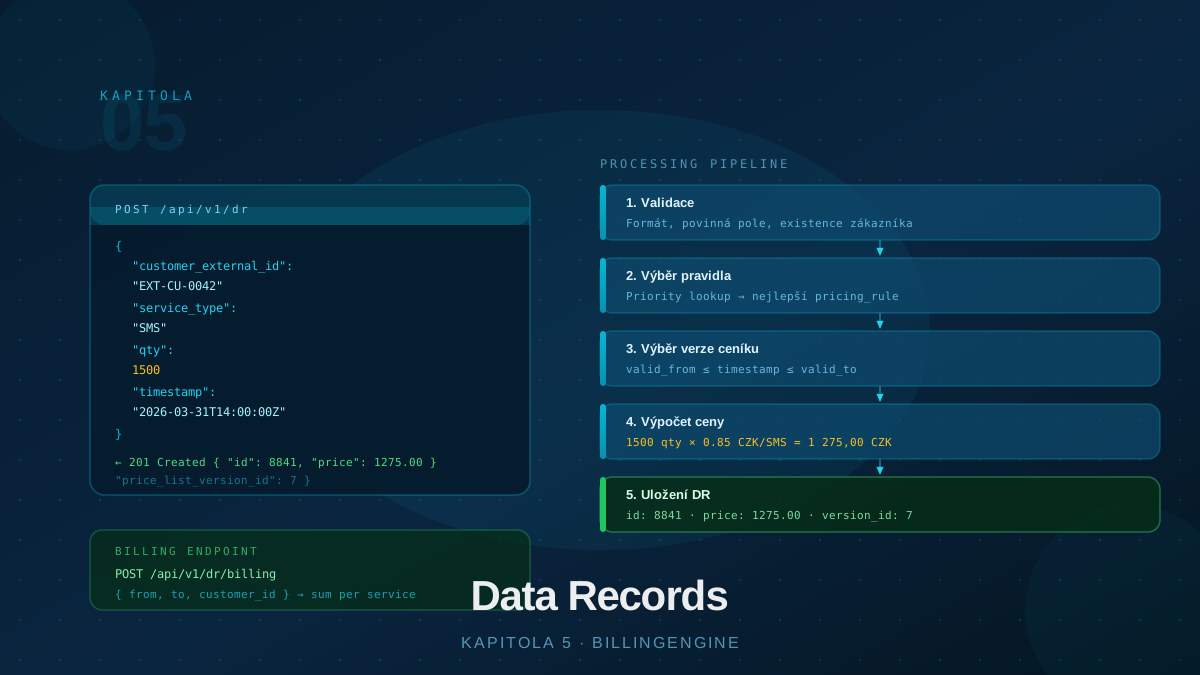
What is a Data Record?
A data record (DR) is the basic input unit of BillingEngine. It represents a single instance of service usage by a customer — sending an SMS, a minute of voice call, a megabyte of data transferred, or any other measurable activity for which you want to bill your customer.
Records are the input to the rating engine — the process that assigns a price to each record based on active pricing rules and the price list versions valid at the time of the record.
Data Record Structure
Each record has the following fields:
| Field | Required | Description |
|---|---|---|
customer_external_id | ✓ | Your customer identifier (customer’s external_id) |
code | ✓ | Service code — must match the code of a price list item |
time_from | ✓ | Event start time (ISO 8601) |
quantity | Quantity, default 1 | |
time_to | Event end time (for interval-based records) | |
service_id | Optional supplementary service identifier | |
external_id | Your own record identifier |
code is the key link — the engine uses it to look up the matching item in the active price list version (price_list_item.code). If the price list does not contain that code, the record cannot be rated.
Submitting Records
Records are submitted as an array in the request body, not as individual objects:
POST /api/v1/dr
Content-Type: application/json

{
  "records": [
    {
      "customer_external_id": "EXT-CU-0042",
      "code": "SMS",
      "quantity": 1500,
      "time_from": "2026-03-31T14:00:00Z",
      "external_id": "MY-SYSTEM-RECORD-99887"
    },
    {
      "customer_external_id": "EXT-CU-0042",
      "code": "VOICE_MIN",
      "quantity": 48,
      "time_from": "2026-03-31T14:05:00Z"
    }
  ]
}
The maximum batch size is 10,000 records (or 5,000 when ondemand: true).
Synchronous vs. Asynchronous Processing
BillingEngine supports two processing modes:
Asynchronous (default, ondemand: false):
Records are stored in a queue and rated in the background. The response arrives immediately with a queueId and list of ids:
{
  "message": "Successfully inserted 2 records",
  "queueId": "uuid-of-queue",
  "ids": ["uuid-record-1", "uuid-record-2"],
  "ondemand": false
}
Check processing status via:
GET /api/v1/dr/status?month=202603&queue_id=uuid-of-queue
Response: { "total": 2, "by_status": { "rated": 1, "unrated": 0, "error": 1 } }
Synchronous (ondemand: true):
Records are rated immediately before being stored. Adding include_rated: true includes rating results in the response:
POST /api/v1/dr
Content-Type: application/json

{
  "ondemand": true,
  "include_rated": true,
  "records": [...]
}
Synchronous mode is suitable for price verification, debugging, or small volumes. For production imports, asynchronous mode is recommended.
The Rating Process
Each record is rated through these steps:
1. Load the customer’s groups — the engine identifies groups for the customer matched by customer_external_id.
2. Select applicable rules — the engine scans all active pricing rules for the partner and selects those matching the customer (or their groups) whose valid_from/valid_to covers the record’s time_from.
3. Select price list version — for each applicable rule, the engine finds the price list version valid at time_from.
4. Look up the price list item — searches for an item with the same code as the record. If not found, the rule is skipped.
5. Calculate the price — applies tarification and computes the price:
billed_qty = apply_tarification(quantity, item.tarification)
price = billed_qty × item.price × (1 - discount / 100)
6. Store — each successful rule creates a separate rated record with the price, currency, discount, and VAT rate.
The engine does not stop after the first matching rule — it creates rated records for all applicable rules (typically both cost and retail simultaneously).
Tarification
Tarification is a telecom mechanism for rounding billed quantities. A price list item may have a tarification field in the format "first_block/subsequent_block":
"60/1"— first block of 60 seconds, then each second separately"60/60"— always rounds up to multiples of 60
Example: tarification "60/60", quantity 75 → billed quantity is 120 (two blocks of 60).
Record Statuses
Every submitted record goes through these states:
| Status | Description |
|---|---|
unrated | Inserted, waiting to be rated |
processing | Rating in progress |
rated | Successfully rated |
error | Rating failed (no matching rule or price list item) |
Records in error or unrated state can be re-rated — individually or in bulk:
POST /api/v1/dr/re-rate
Content-Type: application/json

{ "month": "202603", "status": "error" }
Billing Endpoint
At the end of the billing period, the billing endpoint aggregates prices:
POST /api/v1/dr/billing
Content-Type: application/json

{
  "time_from": "2026-03-01T00:00:00Z",
  "time_to": "2026-03-31T23:59:59Z",
  "billing_category": "retail",
  "group_by": "code"
}
The group_by parameter determines the aggregation dimension: code, type, subtype, or analytic. The response contains totals with a VAT breakdown — the ideal input for invoice generation.
The billing endpoint does not filter by customer — it returns aggregation across all partner records in the given period. To get data for a specific pricing rule, use the pricing_rule_id or pricing_rule_code parameters.
Deleting Records
Records can be deleted individually or in bulk by time range or code:
DELETE /api/v1/dr
Content-Type: application/json

{
  "time_from": "2026-03-01T00:00:00Z",
  "time_to": "2026-03-31T23:59:59Z",
  "code": "SMS"
}
Best Practices
Always set time_from. It is required — records without it cannot be submitted. Pass the actual event time, not the API call time.
Use external_id. Your own record identifier makes lookup and debugging easier. If not set, BillingEngine uses the internal UUID.
Prefer asynchronous mode. For production volumes (thousands of records), submit asynchronously and monitor status via /dr/status. Synchronous ondemand is suitable only for small volumes or price verification.
Monitor error status records. Records without a matching rule or price list item end up in error. Set up regular checks via /dr/status and fix price list or rule configuration accordingly.
Batch sensibly. An optimal batch size is hundreds to low thousands of records. Very large batches may slow down processing.
Conclusion
Data records are the heart of BillingEngine — everything else (price lists, rules, groups, customers) exists to correctly rate them. Understanding the rating process, asynchronous processing, and the billing endpoint gives you a complete end-to-end picture of how the system works. Chapter 6 covers triggers — the advanced mechanism for conditional engine behavior based on specific volumes or customer states.