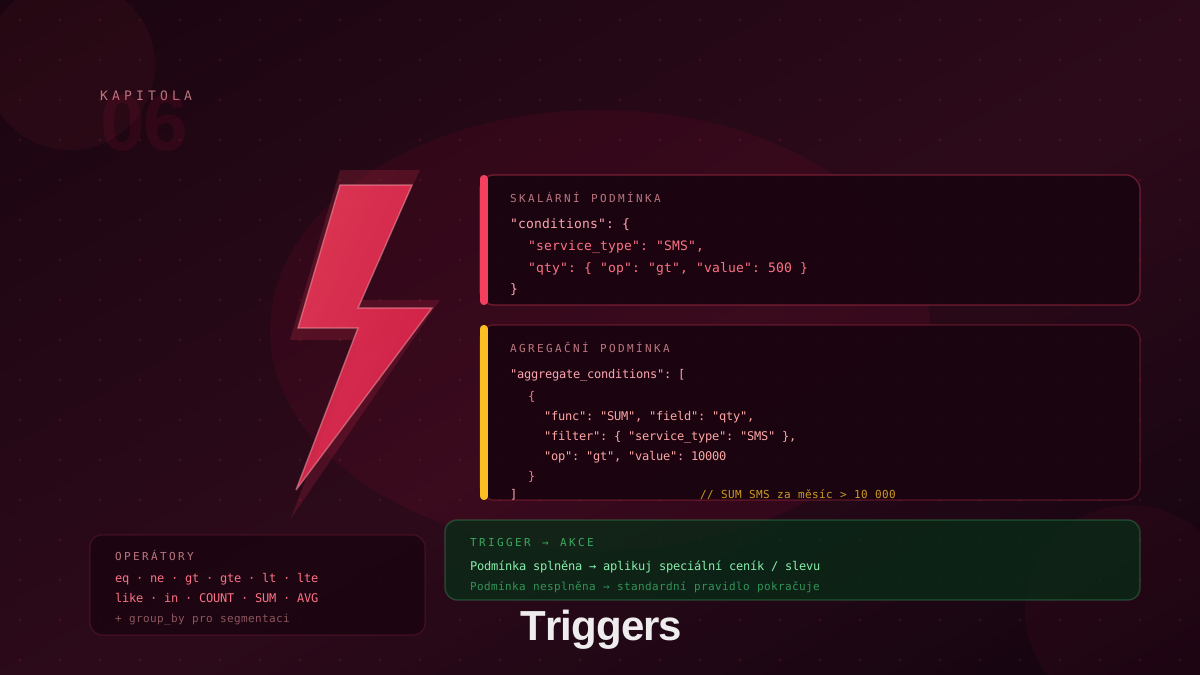
What Are Triggers?
Triggers are an advanced mechanism in BillingEngine that automatically creates new data records when defined conditions are met. While pricing rules decide which price list to use for each record, triggers respond to an incoming record and generate a new DR based on a template (action_template).
Key principle: a trigger does not modify the rating of an existing record — it creates a separate new record that is then rated by the standard engine through pricing rules.
Typical use cases for triggers:
- Per-record surcharges — every SMS record with quantity > 500 generates an additional charge record
- Volume bonuses — a customer who exceeds 200 call minutes in a month receives one bonus record
- Loyalty programs — a customer with more than 1,000 records total receives a loyalty credit
- Overage charges — a customer with more than 1,000 SMS in a month is charged for each additional SMS
Trigger Structure
A trigger consists of the following fields:
| Field | Required | Description |
|---|---|---|
name | ✓ | Human-readable trigger name |
conditions | ✓ | Conditions on data record attributes |
action_template | ✓ | Template for the new DR created when the trigger fires |
aggregate_conditions | Conditions on cumulative values | |
is_active | Boolean, default true |
POST /api/v1/triggers
Content-Type: application/json

{
  "name": "Large SMS batch surcharge",
  "conditions": {
    "code": "SMS",
    "quantity": { "op": "gt", "value": 500 }
  },
  "action_template": {
    "code": "SMS_SURCHARGE",
    "quantity": 1
  },
  "is_active": true
}
action_template: The New Record Template
action_template defines what the new DR created by the trigger will look like. At minimum it must contain code. The new record automatically inherits partner_id, customer_id, time_from, and time_to from the record that fired the trigger.
Special values:
"code": "{original}"— the new record takes thecodeof the triggering record"external_id": "{original}"— the new record takes theexternal_idof the triggering record
The new record is immediately rated by the standard engine after creation — through your configured pricing rules. For a trigger to be functional, a pricing rule must exist for the code used in action_template.
Scalar Conditions
The conditions field is an object whose keys match data record field names and whose values are either a scalar (equality) or an object with an operator:
{
  "conditions": {
    "code": "SMS",
    "quantity": { "op": "gt", "value": 500 }
  }
}
When scalar conditions match, a new record is created for each qualifying DR.
Supported operators:
| Operator | Description |
|---|---|
eq | Equal (default for scalar values) |
ne | Not equal |
gt | Greater than |
gte | Greater or equal |
lt | Less than |
lte | Less or equal |
like | Text pattern (SQL LIKE) |
in | List of values |
Aggregate Conditions
Aggregate conditions allow decisions based on cumulative values for the current month. When met, the trigger creates one new record per customer (not per DR).
{
  "aggregate_conditions": [
    {
      "func": "sum",
      "field": "quantity",
      "filter": { "code": "VOICE_MIN" },
      "op": "gt",
      "value": 200,
      "group_by": "customer_id"
    }
  ]
}
Aggregate condition structure:
func— aggregate function:sum,count,avg,min,maxfield— record field to aggregate over (quantity,id, etc.)filter— optional conditions for selecting records into the aggregationop— comparison operator (gtdefault,gte,lt,lte,eq)value— threshold valuegroup_by— aggregation dimension (typicallycustomer_id)
Combining Conditions
A trigger can have both sets of conditions simultaneously. Both must be satisfied at the same time (logical AND):
{
  "name": "SMS loyalty bonus",
  "conditions": {
    "code": "SMS"
  },
  "aggregate_conditions": [
    {
      "func": "count",
      "field": "id",
      "filter": { "code": "SMS" },
      "op": "gt",
      "value": 1000,
      "group_by": "customer_id"
    }
  ],
  "action_template": {
    "code": "SMS_LOYALTY",
    "quantity": 1
  },
  "is_active": true
}
This trigger fires for a customer who has sent more than 1,000 SMS in total AND whose current record is also SMS. The result is ONE new SMS_LOYALTY record per customer.
Integration with Pricing Rules
The entire pricing mechanism for triggers works through standard pricing rules:
- Create a price list with an item for the code used in
action_template(e.g.SMS_SURCHARGE) - Create a pricing rule referencing that price list
- When the trigger fires, it creates a DR with the specified code — the rule automatically rates it
Example: trigger generates SMS_SURCHARGE records → a rule with billing_category: "retail" references a price list with item code: "SMS_SURCHARGE" and price 2.50 → the customer is charged a surcharge for each trigger activation.
Real-World Examples
Example 1: SMS Overage Charge
An operator has a base tariff for the first 1,000 SMS per month. For each SMS above this limit, the customer pays a higher rate.
{
  "name": "SMS overage charge",
  "conditions": {
    "code": "SMS"
  },
  "aggregate_conditions": [
    {
      "func": "count",
      "field": "id",
      "filter": { "code": "SMS" },
      "op": "gte",
      "value": 1000,
      "group_by": "customer_id"
    }
  ],
  "action_template": {
    "code": "SMS_OVERAGE",
    "quantity": 1
  },
  "is_active": true
}
After reaching 1,000 SMS in a month, the engine generates an SMS_OVERAGE record for each subsequent SMS, rated at the higher rate.
Example 2: Monthly Voice Bonus
Customers who make more than 200 minutes of calls in a month receive one bonus record with a negative price (discount).
{
  "name": "Voice volume — monthly bonus",
  "conditions": {
    "code": "VOICE_MIN"
  },
  "aggregate_conditions": [
    {
      "func": "sum",
      "field": "quantity",
      "filter": { "code": "VOICE_MIN" },
      "op": "gt",
      "value": 200,
      "group_by": "customer_id"
    }
  ],
  "action_template": {
    "code": "VOICE_BONUS",
    "quantity": 1
  },
  "is_active": true
}
Example 3: Loyalty Program
A customer who exceeds 1,000 data records in a month receives a loyalty credit.
{
  "name": "Loyalty program — 1000+ records",
  "conditions": {},
  "aggregate_conditions": [
    {
      "func": "count",
      "field": "id",
      "op": "gt",
      "value": 1000,
      "group_by": "customer_id"
    }
  ],
  "action_template": {
    "code": "LOYALTY_CREDIT",
    "quantity": 1
  },
  "is_active": true
}
Triggers vs. Pricing Rules
| Aspect | Pricing Rules | Triggers |
|---|---|---|
| Output | Record rating | New data record |
| Evaluation | Per each record | Per record + historical data |
| Conditions | Customer/group + time | DR attributes + aggregates |
| Pricing | Direct price list | Price list via rule for action_template code |
| Use case | Standard pricing | Surcharges, bonuses, loyalty rewards |
Pricing rules and triggers complement each other — rules rate original records, triggers add supplemental records for special scenarios.
Best Practices
Always create a rule for the action_template code. Triggers generate new DRs — without a matching pricing rule the new record ends up in error state.
Name action_template codes clearly. SMS_OVERAGE, VOICE_BONUS, LOYALTY_CREDIT are descriptive names. A clear code makes price list configuration and debugging easier.
Test on historical data. Aggregate conditions depend on customer history — when deploying a new trigger, verify how it behaves for customers with varying usage volumes.
Monitor records with source=trigger. Records created by triggers have the flag source: "trigger". Track their count — unexpectedly high frequency signals a poorly calibrated threshold.
Combine with pricing rules. Trigger + rule = complete pricing logic. Standard rates via rules, bonuses and surcharges via triggers.
Conclusion
Triggers are the last piece of the BillingEngine puzzle. By combining scalar conditions on the current record and aggregate conditions on historical data, they allow modeling arbitrarily complex pricing strategies — from simple surcharges to sophisticated loyalty programs. This concludes the overview of BillingEngine’s core entities. For specific integration scenarios, consult the API documentation and explore the test environment.