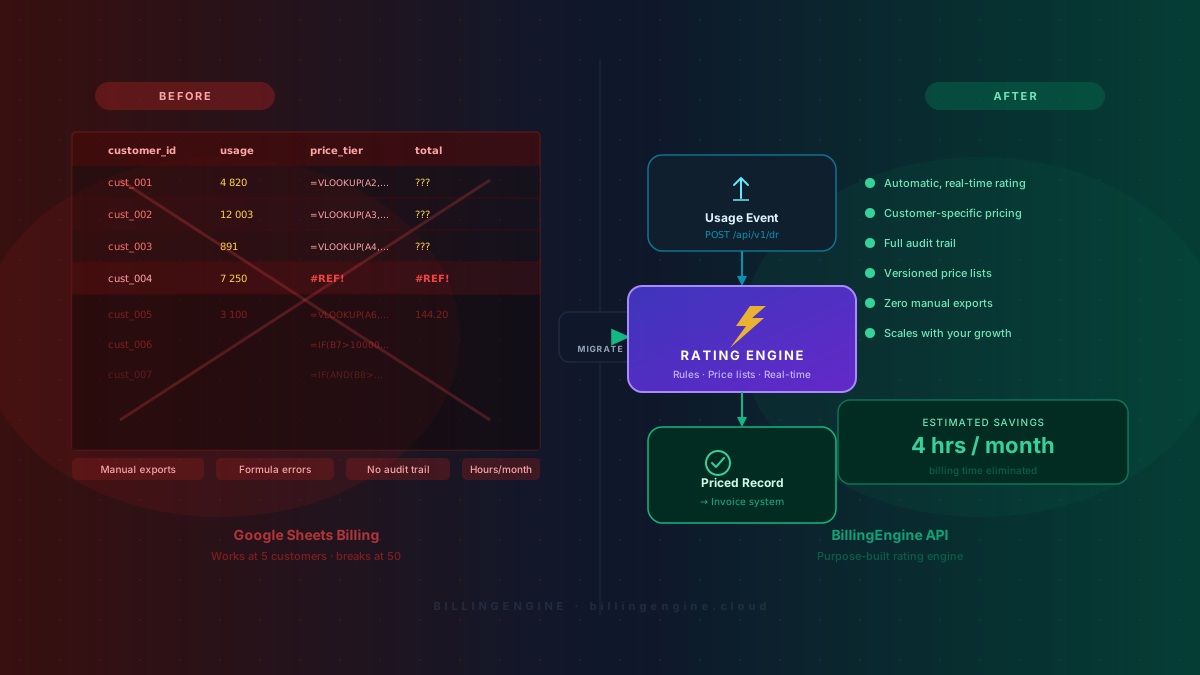
If you’re billing customers based on API usage, you’ve probably been through this at least once:
You export a CSV from your logs. You paste it into Google Sheets. You write a VLOOKUP to match customers to their pricing tier. You calculate totals. You send invoices manually. You do it again next month.
It works — until it doesn’t.
Why Developers Start With Spreadsheets
Spreadsheets aren’t a bad choice at the beginning. When you have 5 customers and a simple flat rate, a spreadsheet is the fastest path to getting paid. No vendor lock-in, no monthly fee, no learning curve.
The problem is that usage-based billing grows more complex than anyone expects — and spreadsheets don’t grow with it.
Where Spreadsheet Billing Breaks Down
Manual exports become a recurring burden. Usage data lives in your logs or your database. Getting it into a spreadsheet means writing export scripts, downloading CSVs, or copy-pasting from dashboards. At first this takes 20 minutes. Then you add customers. Then someone asks for a mid-month invoice. What started as a simple task becomes something everyone dreads.
Pricing changes break everything. You’ll want volume discounts, special rates for new customers, different margins for partners. In a spreadsheet, every change is a manual edit to a formula — and manual edits to billing formulas are how you accidentally undercharge a customer for three months without noticing.
You can’t see what’s happening right now. Spreadsheets are snapshots of the past. If a customer is approaching their usage limit, you won’t know until after you’ve manually updated the sheet. Real-time visibility is table stakes for serious API products — and spreadsheets can’t provide it.
Audits become investigations. When a customer disputes an invoice, you need to show them exactly which events were billed and at what price. With spreadsheet billing, this means going back through export history, cross-referencing logs, and manually reconstructing what happened. A proper audit trail should be automatic, not forensic.
What Usage-Based Billing Actually Needs
The core logic of usage billing is simple:
A usage event happens → find the right price rule → return the price
Everything else — invoicing, payment processing, customer management — can live elsewhere. But this rating logic needs to be fast, accurate, flexible, and auditable. That’s exactly what breaks down in a spreadsheet, and exactly what a purpose-built rating engine handles well.
How a Rating Engine Works
A rating engine sits between your application and your finance system. Your app sends usage events to it. The engine applies the correct pricing rules and returns the price. You aggregate the results and bill the customer.
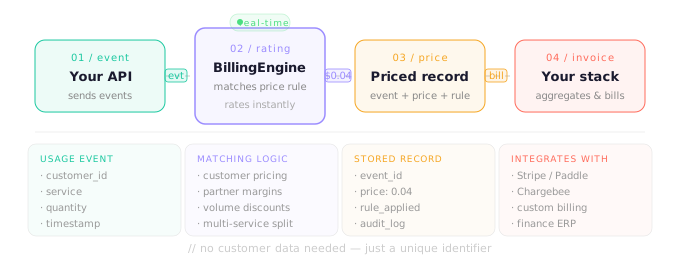
Your API / Service
       ↓
   Usage Event
(customer_id, service, quantity)
       ↓
   Rating Engine
(finds matching price rule, calculates price)
       ↓
   Priced Record → Your Invoice System
No spreadsheets. No exports. No manual calculations.
How BillingEngine Fits In
BillingEngine is built around this model. The core idea is simple: send a usage record → get a price back.
You don’t need to hand over customer payment details or sensitive data. BillingEngine only needs a unique identifier to apply the right pricing rules.
What it handles:
- Customer-specific pricing — different rates applied automatically per customer ID
- Partner commissions and margins — without hard-coding anything in your app
- Usage split across multiple services or billing categories
- Real-time rating — every event priced as it happens, not in batch at month-end
What it’s not: BillingEngine is a rating engine, not a payment processor or subscription platform. It answers “how much does this usage cost?” — the rest of your stack handles collection. This narrow focus is intentional. A tool that tries to do everything usually does nothing well.
Making the Switch
If you’re currently billing from spreadsheets, the migration is simpler than it sounds.
- Identify your usage events — what do customers do that you bill for? API calls, records processed, storage used?
- Map your pricing rules — write them in plain language first, then translate into BillingEngine’s format
- Integrate the API — a simple REST call from your application; for most teams, a few hours of work
- Run in parallel for one cycle — compare BillingEngine output against your spreadsheet to verify accuracy
- Retire the spreadsheet — archive it, but stop using it for billing
The Real Cost of Doing Nothing
Spreadsheet billing feels free because there’s no invoice for it. But the cost is real.
If billing takes 4 hours per month and your time is worth $75/hour, that’s $3,600/year spent on a process that should be automated. That’s before counting time spent fixing errors — and errors in spreadsheets are common and often invisible until they’ve accumulated for months.
A single billing mistake — undercharging a customer for a quarter, or overcharging and triggering a dispute — can cost far more than any tooling. And every hour spent on manual billing is an hour not spent on your product.
Conclusion
Spreadsheets are the right starting point for early-stage billing. But usage-based billing has a natural inflection point where they stop being an asset and start being a liability.
When exports take too long, when pricing changes feel risky, when you can’t answer a customer’s billing question without running a manual calculation — it’s time to move to something purpose-built.
BillingEngine handles the rating layer so you don’t have to. Simple to integrate, flexible enough for complex pricing rules, and focused on doing one thing well.